Powershell History

PowerShell History File

There are at least five methods to monitor PowerShell, each with its own pros and cons. While you can check out the Logless Huntarrow-up-right room and research AMSI and Transcript Logging topics, in this room, we will focus on a simple but effective way to track PowerShell commands - the PowerShell history file:

C:\Users\<USER>\AppData\Roaming\Microsoft\Windows\PowerShell\PSReadline\ConsoleHost_history.txt
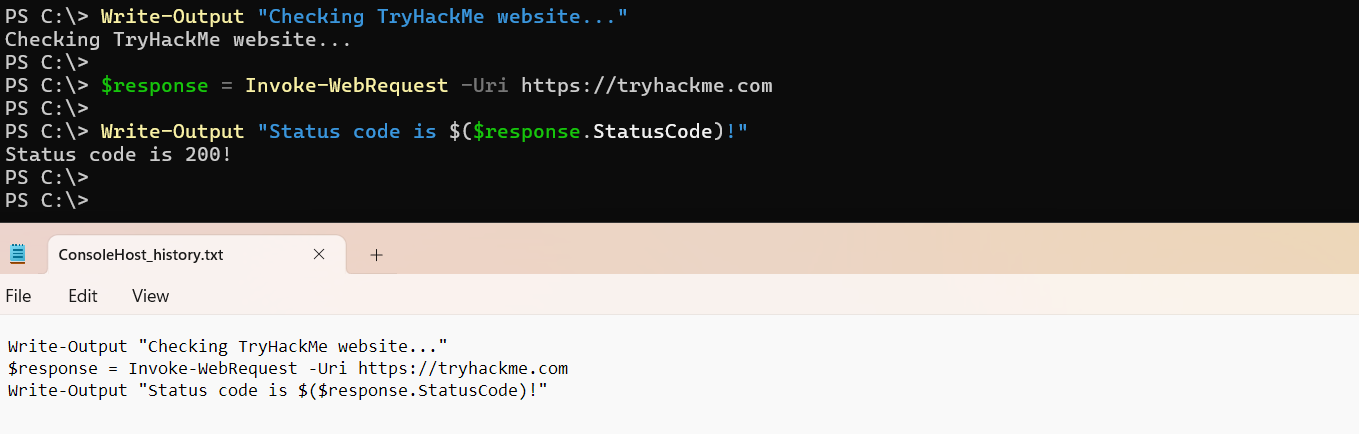
The PowerShell history file is a plain text file automatically created by PowerShell. It simply records every command you type into a PowerShell window and is immediately updated when you press Enter to submit a command:

Screenshot of PowerShell terminal with multiple entered commands, and a screenshot from the history file opened in Notepad showing that all commands were logged to the file

Key Notes

  • The history file is very useful for tracking malicious actions like system discovery or malware download

  • The history file is created for every user, meaning that you may see five files if there are five active system users

  • It survives system reboots unless manually deleted and saves all PowerShell commands entered for all time

  • It does not log command outputs and does not show script content (e.g. when running powershell .\script.ps1)

Last updated